
THIS TOOL AND WHO IT’S FOR
The Translation Insights and Perspectives (TIPs) tool helps to introduce the many translated languages of the Bible so we can all learn from each other, even though the languages might not be directly accessible to us. The tool is aimed at anyone who is interested in languages and the interconnection between them, whether they are Christian or not.
The collected data is recorded in the form of “insights” — descriptions of how one word, phrase, or linguistic attribute is handled in one or various languages or how a linguistic feature that exists in some but not all languages leads to an altered view of the biblical text.
All insights are of a temporary nature because data is constantly being added to this tool. If you have information to add to an existing story, please use the “Leave a Comment” link at the bottom of any story, or select “Submit” in the top menu (or under the menu button: ☰) to enter data for a new record.
HOW TO ACCESS CONTENT
Freeform search
The quickest and easiest way to access information in the TIPs database is by entering any term or phrase in the Search Terms box on the right-hand side of the top of every page.

The results will return text contained in any insight or its heading. Note that you cannot use wildcards in your searches.
Not entering anything into the search bar and instead double-clicking on the magnifying glass will take you to the most recently entered insights.
Categorical search
It’s also possible to search in a more focused fashion. You can use either the top menu (or the items listed under the menu button: ☰) and/or footer of each page to see the list of insights under their respective categories.
Verses
The quickest way to search for specific verses is by entering them (in one of the common abbreviations) in the Find Verse box on the left-hand side of the top of every page.

If the verse has an insight recorded, the corresponding page will be displayed (see below), if there is no insight recorded, a page will be displayed with all other verses in the book with available data:

You can also look for individual verses by selecting “Verses” in the footer of the homepage. If you do that, you’ll be presented with a list of all books and verses in the Bible (including all deuterocanonical or apocryphal books used by the Catholic and Orthodox confessions, if applicable) for which a story is recorded. Selecting any of the titles of the biblical books will open up a list of available chapters, and selecting a chapter will open up the available verses. See the example below for Genesis 2:

Selecting one of the verses will open the verse view with one or several insights.
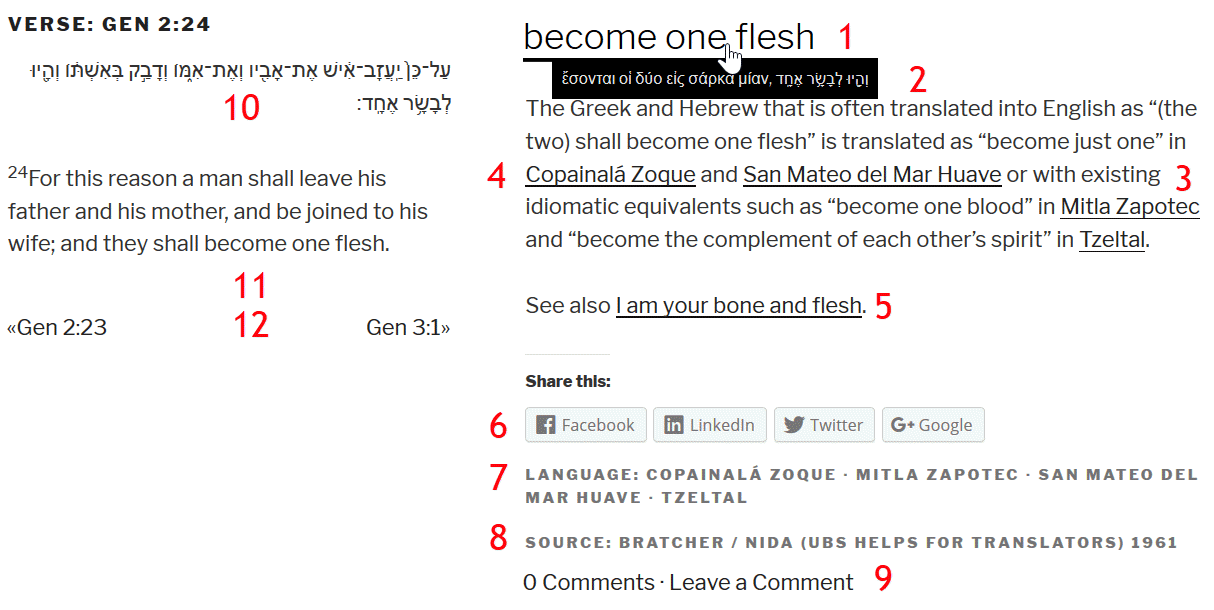
The heading (1) lists the word, phrase, or attribute in question. By hovering over the heading or tapping it, the original Greek and/or Hebrew text of the word or phrase will be displayed (2), if applicable. Underneath the heading, the actual story is listed (3).
The first occurrence of any language in the insight listed is underlined as a hyperlink (4) to a listing of all stories in which that language is mentioned (see “Language” below). You can open the same page by selecting the respective language in the listing (7) under the social media links (6).
If there is another story with related content, you will see it listed following the original insight as a hyperlink (5).
Under “Source” you will see the source(s) that was/were used for this story (8). Selecting it will open the “source view.” For more on that, see “Sources” below.
By selecting “Leave a Comment” (9) you can enter corrections or amendments to the existing story.
On the left you will see the original text for the current verse in Greek (from: The Greek New Testament, © 2014 Deutsche Bibelgesellschaft, 28th ed. and Septuaginta, © 2007 Deutsche Bibelgesellschaft), Hebrew (from: Biblia Hebraica Stuttgartensia, © 1977/1997 Deutsche Bibelgesellschaft), or Latin (from: Biblia Sacra Vulgata [Editio quinta], © 1983 Deutsche Bibelgesellschaft) (10) and the translated text into English (from: New Revised Standard Version, Updated Edition, © 2021 National Council of the Churches of Christ in the United States of America. Used by permission All rights reserved.) (11).
Right below the English translation you will find links to the preceding and succeeding verses for which stories are recorded (12).
Language
If you select “Languages” (or if you select “Languages” in the footer of each page or “Languages” under the menu button: ☰), you’ll be presented with an alphabetical listing of all the languages that are presently represented in the TIPs tool. Selecting any of the letters will open up a list of entries:

If you select one of the languages, you will come to a page where all insights associated with that language are listed:

On the top of the page, underneath the language name, you can see the immediate language group the language belongs to (1) (for more information about how to use that feature, see here); a link to the Wikipedia page (2) with information about the relevant language; and a link to an online version of a translation of the Bible or a portion thereof in that language (3) (if available). Note that the linked version(s) might not be the same as is described in the story.
Term
If you select “Term / Phrase / Attribute” in the footer of each page, you’ll be presented with an alphabetical listing of all the words, phrases, and linguistic attributes that are presently collected in the TIPs tool. Selecting any of the letters will open up a list of entries:

Selecting one the entries will open the term view:

The “term view” is similar to the “verse view” (see above) with two exceptions: There is no display of the Greek/Hebrew text in the left column, and the category “Verse” (1) is found between “Language” and “Source” at the bottom, including a hyperlinked list of all the verses that contain the relevant word, phrase, or attribute.
Source
If you select “Sources” in the footer of each page, you’ll be presented with an alphabetical list of all the sources that are presently being used for the TIPs tool. Selecting any of the letters will open up a list of entries:

If you select one of the sources, you will come to a page where all stories associated with that source are listed:

On the top of the page you can see the full biographical details of that source (1). If only a personal name with no date is listed as the source, the information was shared privately or in a source that is not publicly available (such as Paratext).
If quotes from sources are lengthy, you will often find a feature to collapse long-form text:

The little triangle that points to the right shows that you can select this paragraph or line to see expanded text (note that your mouse cursor will NOT change into the typical pointer icon for clicking on links):

Once expanded, the triangle now points downward. To collapse the text, select the paragraph or line again.
Graphics
For stories with a lot of entries of different languages and translations, there will be a link at the beginning of the story to a graphic that provides a simple overview of the term and its many translations:

Once you click on the link, a graphic will display the translations in a graphical format for a quick overview:

Clicking on the “horizontal” option on the bottom of this page allows you to change to a radial view of the same content:

Translations
Some stories that are deemed to be highly relevant for readers of the language in question are also translated into that language. You can access the translation by selecting the link “Translation: <language>” underneath the story:

RSS Feed
If you would like to subscribe to an RRS feed for all newly released stories and news items you can do that by using your favorite RSS reader and opening tips.translation.bible/feed.